
Bringing all your friends together on a single Minecraft server
Playing Minecraft with friends is one of gaming’s finest experiences, but a common barrier often gets in the way: some friends play on PC with Java Edition, while others are on mobile, tablet, console, or Windows with Bedrock Edition. Historically, uniting these two player bases required manual bridges, custom port forwarding, and intricate configuration files.
To remove this barrier once and for all, we designed the new Minecraft Java + Bedrock Pack on BoxToPlay. Available directly within your panel’s modpack catalog, this turnkey recipe automatically installs and configures all necessary components to provide seamless, immediate crossplay on your server.
Explore full details on our Java + Bedrock modpack page.
How does Java + Bedrock crossplay work?
This pack builds upon a proven community architecture designed to save you time and eliminate setup headaches:
- Paper as the robust server foundation: you benefit from Paper’s outstanding performance, optimized tick loop, and extensive compatibility with Spigot and Paper plugins.
- Geyser protocol translator: Geyser seamlessly translates Bedrock network packets into Java protocol packets on the fly, allowing mobile, console, and Windows players to share the exact same world with Java players.
- Floodgate seamless authentication: your Bedrock friends connect directly with their existing Microsoft accounts, without needing to purchase a separate Java license. Their in-game username appears with an intuitive prefix.
- NeoForge option for mod enthusiasts: for creators who want server-side mods, a NeoForge preset is also available during installation. Keep in mind that mods requiring custom client-side assets remain exclusive to Java players.
A standout benefit on BoxToPlay is connection simplicity: you share one single address with all your players, without any extra network setup.
Tutorial: installing the pack in 4 simple steps
Installation takes less than a minute straight from your client area. Here is the complete step-by-step walkthrough.
Step 1: Select the pack in the catalog
Head over to the Modpacks tab of your Minecraft server in the BoxToPlay panel. Under the recommended and cross-platform list, locate the Java + Bedrock card and click the green Install button.
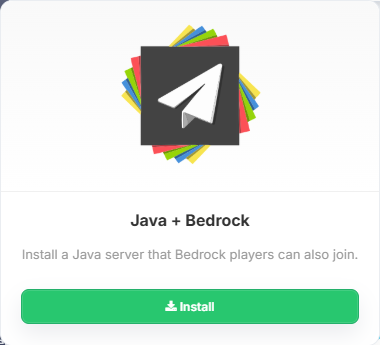
This card bundles all necessary components into a single, unified one-click installation flow.
Step 2: Choose your engine and install options
A configuration modal opens, allowing you to tailor the installation to your server’s needs:
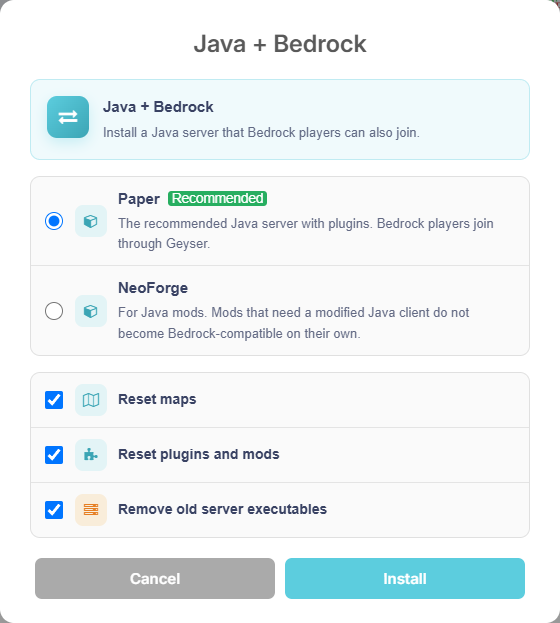
From here, you can:
- Keep the Paper engine (recommended for peak stability and plugin support) or select NeoForge for a modded experience.
- Choose whether to preserve or reset your existing maps.
- Decide whether to preserve or clear existing plugins, mods, and old server executables.
Once your preferences are selected, click Install. The panel automatically sets up the environment, downloads the latest compatible versions of Paper, Geyser, and Floodgate, and writes optimized configurations.
Step 3: Confirm the installation
Once the files are deployed, a success dialog confirms that your server engine and crossplay bridges are ready:

All that remains is clicking Restart the server to boot up your newly configured instance.
Step 4: Watch crossplay initialize in the live console
Open your Live Console to observe the boot sequence. Within seconds, you will see Paper load, followed by the initialization of Geyser and Floodgate:
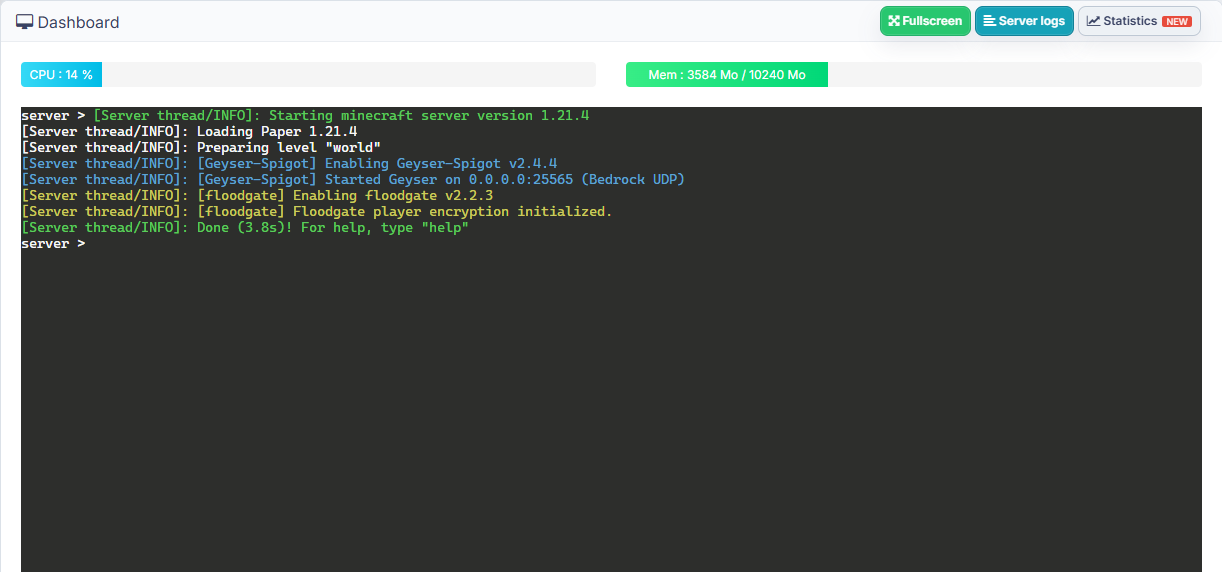
As soon as the console confirms that the server is ready, your crossplay gateway is fully operational and ready to welcome your players.
How your friends join your server
Once the server is running, connecting is straightforward for everyone:
- For Java players (PC, Mac, Linux): they simply add your server address (IP and port, or BoxToPlay subdomain) in their standard multiplayer menu.
- For Bedrock players on mobile, tablet, or Windows: they add a new server in the Servers tab using the address and port assigned to your server in the panel.
- For console players (Nintendo Switch, PlayStation, Xbox): console editions restrict manual server entries by default. Friends can use a companion mobile app such as BedrockTogether on their local Wi-Fi, or adjust DNS settings to make your server show up under their console’s LAN tab.
Ready to start your crossplay adventure?
With this all-in-one pack, you no longer need to spend hours editing configuration files, chasing compatible plugin versions, or troubleshooting network ports. You get the best of both Minecraft editions on a single, high-performance host.
Experience this feature today on your server from your BoxToPlay client panel, explore the full overview on our Minecraft Java + Bedrock pack page, or browse our Minecraft server catalog to launch a brand new server!
More Articles
What's new at BoxToPlay: statistics and plugin catalogs
September 18, 2026Minecraft 26.3: Wilderness Bound update is here
September 15, 2026Anti-Xray on Fabric and NeoForge: Block X-Ray Without Paper
September 11, 2026Minecraft Inventory Editor: Manage Player Inventories from the Panel
September 08, 2026