
Plugin The Enchant Box
The Enchant Box
The Enchant Box
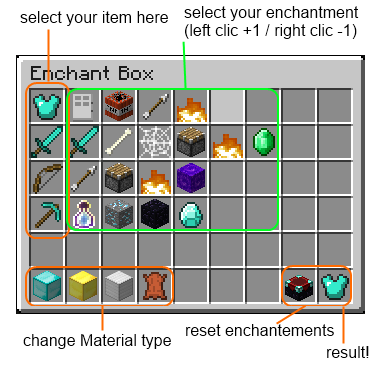
The Enchant Box is an old Bukkit plugin that adds a dedicated enchanting interface to a Minecraft server. Instead of relying only on commands, players can open the Enchant Box with /ebox and manage several enchantments on an item through a clear inventory style menu.
The plugin respects vanilla enchantment restrictions, displays each available enchantment with a configurable icon, and shows its current level directly in the interface. Access can be controlled with the EnchantBox.use permission, making it useful for survival, economy, or administration focused servers. At BoxToPlay, we recommend checking compatibility carefully because the published release targets very old Bukkit versions.
Available Versions
How to add The Enchant Box to your Minecraft server
Select your version
Select the version of The Enchant Box you want installed on your Minecraft server.
Check your cart
You go directly to your cart with the Minecraft plan and selected version of The Enchant Box already included. Check that everything is correct before continuing.
Receive your server
Wait while your Minecraft server is built and delivered. Installation of your selected The Enchant Box version starts during setup. Once it is ready, connect and have fun.
Ready to use The Enchant Box?
Create your Minecraft server and install the The Enchant Box plugin with one click!