
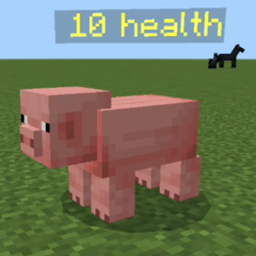
Add-on Zephyr Health Indicator (zc)
Zephyr Health Indicator (zc)
Zephyr Health Indicator (zc) for Minecraft Bedrock
Zephyr Health Indicator is a lightweight Minecraft Bedrock add on that displays the health of nearby mobs, making combat easier to read at a glance. A visual health bar helps you judge whether an enemy is still dangerous, choose targets more effectively, and decide when it is safer to retreat or finish the fight.
The indicator is also useful for protecting friendly creatures, such as wolves and iron golems, by showing when they are close to defeat. Designed for survival, PvP, and everyday server play, it focuses on clear information without changing the game world. At BoxToPlay, we recommend it for players who want more precise combat awareness. The Beta API experiment is required.
Available Versions
How to add Zephyr Health Indicator (zc) to your Bedrock server
Select your version
Select the version of Zephyr Health Indicator (zc) you want installed on your Minecraft Bedrock server.
Check your cart
You go directly to your cart with the Minecraft Bedrock plan and selected version of Zephyr Health Indicator (zc) already included. Check that everything is correct before continuing.
Receive your server
Wait while your Minecraft Bedrock server is built and delivered. Installation of your selected Zephyr Health Indicator (zc) version starts during setup. Once it is ready, connect and have fun.
Ready to use Zephyr Health Indicator (zc)?
Create your Minecraft Bedrock server and install the Zephyr Health Indicator (zc) add-on with one click!