
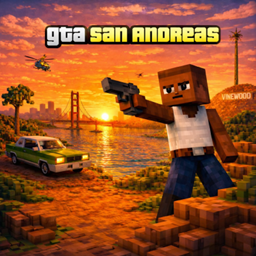
Add-on GTA San Craft
GTA San Craft
GTA San Craft, San Andreas characters in Minecraft Bedrock
GTA San Craft is a Minecraft Bedrock add on that brings the atmosphere of Grand Theft Auto San Andreas into survival gameplay through themed characters and encounters. At present, CJ is the main available mob, appearing in the morning and helping players battle undead creatures, monsters, and illagers. The creator also plans additional CJ outfits and variants, giving the project room to grow.
It is a playful choice for a themed Minecraft server, urban roleplay world, or action focused survival session. At BoxToPlay, we recommend it for players who want a recognizable San Andreas touch without replacing Minecraft’s core exploration and progression.
Available Versions
How to add GTA San Craft to your Bedrock server
Select your version
Select the version of GTA San Craft you want installed on your Minecraft Bedrock server.
Check your cart
You go directly to your cart with the Minecraft Bedrock plan and selected version of GTA San Craft already included. Check that everything is correct before continuing.
Receive your server
Wait while your Minecraft Bedrock server is built and delivered. Installation of your selected GTA San Craft version starts during setup. Once it is ready, connect and have fun.
Ready to use GTA San Craft?
Create your Minecraft Bedrock server and install the GTA San Craft add-on with one click!