
BoxToPlay launches its TeamSpeak hosting offers
We’re excited to introduce our new TeamSpeak hosting offers at BoxToPlay. You can now create a full TeamSpeak server for your guild, esports team, or gaming community, with high‑quality voice and management tools designed for everyday use.

Plans are organized by slot capacity, so you can choose the size that fits your needs, from small private groups to large communities. All TeamSpeak servers benefit from the same technical foundation: performance, stability, and direct integration with the BoxToPlay panel.
To explore all options, visit our dedicated page: discover our TeamSpeak hosting offers.
A smooth and stable voice experience
We’ve designed this service around three main pillars:
- Premium voice quality for clear conversations in any situation.
- Ultra‑low latency, ideal for competitive gaming, roleplay, or structured meetings.
- Anti‑DDoS protection specifically tuned for voice servers, so your channels stay available even under attack.
Every server also includes unlimited file storage and transfer, making it easy to share configs, documents, or screenshots with your community.
If you want to try this experience for yourself, you can get started here: TeamSpeak hosting with BoxToPlay.
A panel designed to manage your TeamSpeak server
We’ve integrated dedicated TeamSpeak tools directly into the BoxToPlay panel to simplify your daily management.
Real‑time live console
At a glance, you can see:
- the list of channels;
- the connected clients and their details;
- your server’s live activity.

With the live console, you don’t just monitor the server: you can also manage your channels as if you were connected from the TeamSpeak client itself.

Creating, editing, or deleting channels, and reorganizing the whole structure, is all done directly from the BoxToPlay interface.
Advanced groups and permissions
TeamSpeak’s permission system is very powerful. We’ve made it fully configurable from the panel without losing any granularity:
- creation of server groups (Guest, Member, Admin, etc.);
- management of channel groups for room‑specific permissions;
- fine‑tuning of each individual permission.

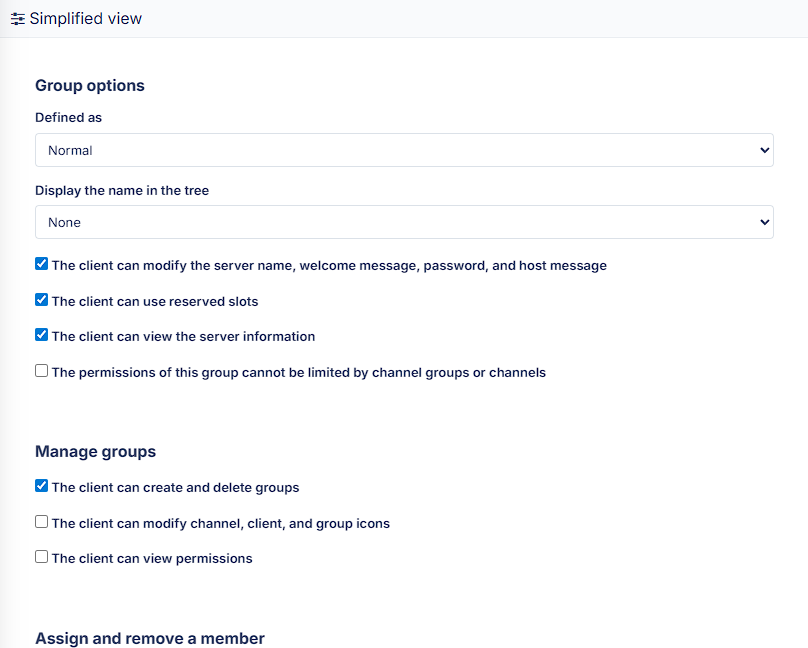
This way, you keep full control over who can create channels, move users, use reserved slots, or administer the server.
Bots, scripts, and Server Query
For communities that automate their management, our servers are compatible with bots and Server Query. You get:
- a clear Server Query connection address;
- dedicated accounts for your bots;
- an integrated Server Query console.

This makes it easy to integrate moderation bots, music bots, or your own tools, while always keeping visibility on what they run.
Hosting designed for your community
Our TeamSpeak offers include by default:
- fully customizable channel structure;
- precise management of permissions and ranks;
- integrated TeamSpeak Web Viewer to display your server structure on your website;
- customizable subdomain;
- automatic server updates;
- compatibility with TeamSpeak 6.
You simply choose the number of slots that fits your usage, from a small private server with friends to a large community hub. Plans are scalable, so you can adjust capacity as your community grows.
To see which configuration matches your needs, head over to: TeamSpeak hosting offers.
Assisted migration from another TeamSpeak server
If your community already uses a TeamSpeak server elsewhere, our assisted migration system helps you move it over:
- import your existing channels, groups, permissions, and organization;
- bring your server back online on BoxToPlay quickly;
- avoid having to reconfigure everything from scratch.
Your members instantly find their usual rooms and permissions as soon as they reconnect.
Free trial, instant delivery, and ready to play
With this launch, you can try a TeamSpeak server for free. This lets you experience:
- audio quality;
- latency;
- the comfort and speed of the BoxToPlay panel.
Once you validate your order, delivery is instant: your server is created in a few seconds and you can start configuring channels, assigning groups, and opening it to your community.
If you’re ready to give it a go, you can start here: try your TeamSpeak server with BoxToPlay.
Start your TeamSpeak server today
With this new TeamSpeak hosting service, we reinforce our commitment at BoxToPlay to offer reliable, high‑performance hosting tailored to gaming communities.
Want to get started right away? Create your TeamSpeak server now from our dedicated page: discover our TeamSpeak hosting offers.
More Articles
Tiny Takeover: baby mobs conquer your Minecraft worlds
March 24, 2026Minecraft 1.21.11: New Mounts and Combat Mechanics
December 26, 2025Minecraft 1.21.9: The Copper Age, what you need to know
October 06, 2025Soar into Minecraft 1.21.6 – "Chase the Skies"
July 03, 2025