
Plugin dynmap-residence
dynmap-residence
Dynmap Residence for Minecraft Servers
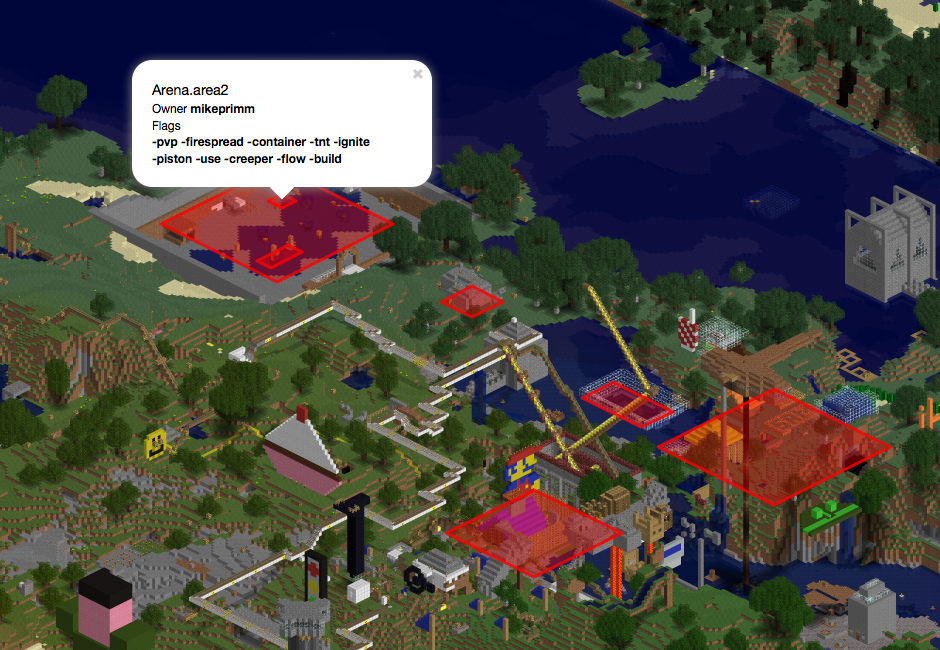
Dynmap Residence connects the Residence protection plugin with Dynmap, displaying player owned zones and subzones directly on the server’s interactive web map. Players and staff can quickly identify protected areas, ownership details, flags, and property status while exploring the world.
The plugin supports configurable region styles, visibility filters, nested subzones, optional three dimensional volumes, and customizable information popups. Residence changes can refresh automatically on a schedule or immediately when supported events occur. At BoxToPlay, it provides a clearer overview of protected land and improves navigation across a busy Minecraft server.
Available Versions
How to add dynmap-residence to your Minecraft server
Select your version
Select the version of dynmap-residence you want installed on your Minecraft server.
Check your cart
You go directly to your cart with the Minecraft plan and selected version of dynmap-residence already included. Check that everything is correct before continuing.
Receive your server
Wait while your Minecraft server is built and delivered. Installation of your selected dynmap-residence version starts during setup. Once it is ready, connect and have fun.
Ready to use dynmap-residence?
Create your Minecraft server and install the dynmap-residence plugin with one click!