
Plugin ColoredGroups
ColoredGroups
ColoredGroups, Chat Formatting for Minecraft Servers
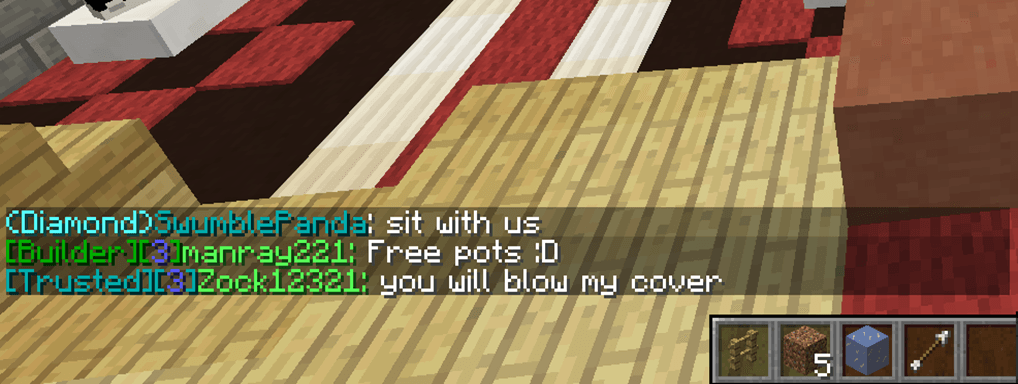
ColoredGroups is a lightweight Bukkit plugin that formats chat messages according to each player’s permission group. Through Vault, it detects groups from supported permission systems and lets server owners customize prefixes, displayed group names, colors, and message structure from its configuration.
Designed for a clean and efficient Minecraft server, it can also color player nametags based on their group and includes commands to preview formats, reload settings, or import profiles from another chat formatter. It is a legacy project, with official documentation listing Minecraft 1.14 and a final update dated September 29, 2019. BoxToPlay makes server management easier with automatic one click setup.
Available Versions
| Version | Minecraft | Actions |
|---|---|---|
| v2.0.3 | 1.11 - 1.10 | |
| v2.0.3 | 1.10 | |
| v1.6.1 | CB 1.6.2-R0.1 | |
| v1.6 | 1.6.2 - 1.6.1 | |
| v1.5.4 | 1.5.1 - CB 1.5.1-R0.1 | |
| v2.0.2 | 1.8.1 | |
| v2.0.1 | 1.8.1 | |
| v2.0.0 | 1.8.1 | |
| v1.7.0 | 1.8.1 | |
| v1.6.4 | 1.8.1 |
How to add ColoredGroups to your Minecraft server
Select your version
Select the version of ColoredGroups you want installed on your Minecraft server.
Check your cart
You go directly to your cart with the Minecraft plan and selected version of ColoredGroups already included. Check that everything is correct before continuing.
Receive your server
Wait while your Minecraft server is built and delivered. Installation of your selected ColoredGroups version starts during setup. Once it is ready, connect and have fun.
Ready to use ColoredGroups?
Create your Minecraft server and install the ColoredGroups plugin with one click!