
Map Presentation updated (texturepack/resourcepack view)
Presentation updated (texturepack/resourcepack view)
Presentation Updated, Resource Pack Showcase Map
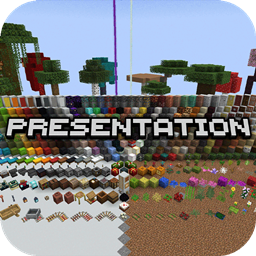
Presentation Updated is a Minecraft map created to test and display resource packs in a clear, organized environment. Its central presentation area offers a quick overview of how a pack changes Minecraft, while themed rooms let you inspect wood, equipment, dyes, paintings, ores, plants, variants, and other visual details without spending hours in survival.
It is especially useful for resource pack creators preparing screenshots, but it also helps players compare styles before choosing a look for a Minecraft server. The project continues the original Presentation map and includes releases for several versions, from 1.19 through 1.21.6. At BoxToPlay, we recommend it as a practical visual showroom for creative testing.
Available versions
How to add Presentation updated (texturepack/resourcepack view) as a Minecraft world
Select your version
Select the version of Presentation updated (texturepack/resourcepack view) you want to use as your Minecraft world.
Check your cart
You go directly to your cart with the Minecraft plan and selected version of Presentation updated (texturepack/resourcepack view) already included. Check that everything is correct before continuing.
Receive your server
Wait while your Minecraft server is built and delivered. Your selected Presentation updated (texturepack/resourcepack view) world version is prepared during setup. Once it is ready, connect and have fun.
Ready to play Presentation updated (texturepack/resourcepack view)?
Create your Minecraft server and install the Presentation updated (texturepack/resourcepack view) map as a new world in one click.