
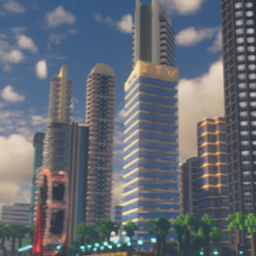
Map SkyShore City
SkyShore City
SkyShore City, a coastal Minecraft map
SkyShore City is a detailed urban Minecraft map inspired by coastal cities, designed for exploration and server based gameplay. Its layout spans two islands: one combines smaller buildings with residential homes, while the other brings together modern beachfront houses and a downtown district lined with contemporary towers. The contrast between quieter neighborhoods and a metropolitan skyline creates a varied setting for roleplay, creative projects, sightseeing, or survival bases.
Use it as a distinctive hub or open city environment on your Minecraft server. At BoxToPlay, our one click setup makes it easy to add this atmospheric seaside city and give players a spacious place to explore together.
Available versions
How to add SkyShore City as a Minecraft world
Select your version
Select the version of SkyShore City you want to use as your Minecraft world.
Check your cart
You go directly to your cart with the Minecraft plan and selected version of SkyShore City already included. Check that everything is correct before continuing.
Receive your server
Wait while your Minecraft server is built and delivered. Your selected SkyShore City world version is prepared during setup. Once it is ready, connect and have fun.
Ready to play SkyShore City?
Create your Minecraft server and install the SkyShore City map as a new world in one click.