
Plugin Dynmap-GriefPrevention
Dynmap-GriefPrevention
Dynmap GriefPrevention
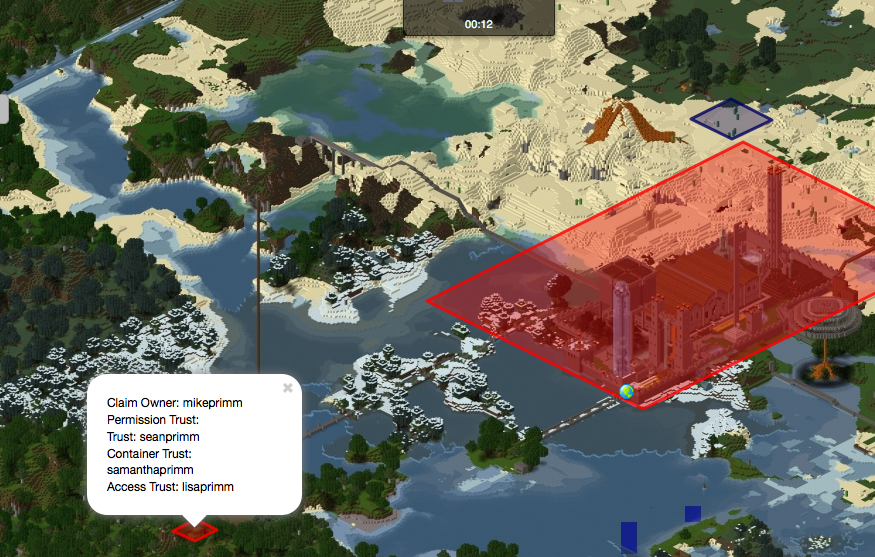
Dynmap GriefPrevention is a Minecraft server plugin that connects GriefPrevention with Dynmap, displaying protected land claims directly on the online map. Each claim appears as a visible area marker, making borders easier to understand and helping players recognize protected territory before building, exploring, or planning community projects.
Designed for servers that use both GriefPrevention and Dynmap, it keeps the map aligned with the protection system as claims are created or changed. This practical overview improves communication between players and staff, supports smoother land management, and gives our BoxToPlay servers a clearer visual way to present protected areas.
Available Versions
How to add Dynmap-GriefPrevention to your Minecraft server
Select your version
Select the version of Dynmap-GriefPrevention you want installed on your Minecraft server.
Check your cart
You go directly to your cart with the Minecraft plan and selected version of Dynmap-GriefPrevention already included. Check that everything is correct before continuing.
Receive your server
Wait while your Minecraft server is built and delivered. Installation of your selected Dynmap-GriefPrevention version starts during setup. Once it is ready, connect and have fun.
Ready to use Dynmap-GriefPrevention?
Create your Minecraft server and install the Dynmap-GriefPrevention plugin with one click!