
Datapack Show Dimension In Name
Show Dimension In Name
Show Dimension In Name for Minecraft
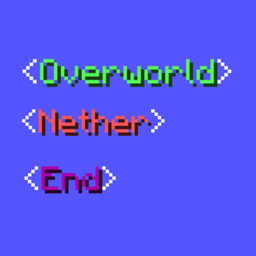
Show Dimension In Name is a lightweight Minecraft datapack for Java Edition that displays the dimension currently occupied by each player beside their name. Whether someone is exploring the Overworld, visiting the Nether, or entering the End, the information remains visible at a glance, making multiplayer coordination clearer.
Designed for server side use, this vanilla friendly utility adds a practical social feature without changing progression, terrain, or combat. It supports several Minecraft releases, including 1.20, 1.20.4, 1.21, 26.1, and 26.2. Our BoxToPlay team recommends it for any Minecraft server where players need to track friends quickly.
Available Versions
How to add Show Dimension In Name to your Minecraft world
Select your version
Select the version of Show Dimension In Name you want installed on your Minecraft server.
Check your cart
You go directly to your cart with the Minecraft plan and selected version of Show Dimension In Name already included. Check that everything is correct before continuing.
Receive your server
Wait while your Minecraft server is built and delivered. Installation of your selected Show Dimension In Name version starts during setup. Once it is ready, connect and have fun.
Ready to use Show Dimension In Name?
Create your Minecraft server and install the Show Dimension In Name datapack with one click.