
Plugin Dynmap-WorldGuard
Dynmap-WorldGuard
Dynmap WorldGuard
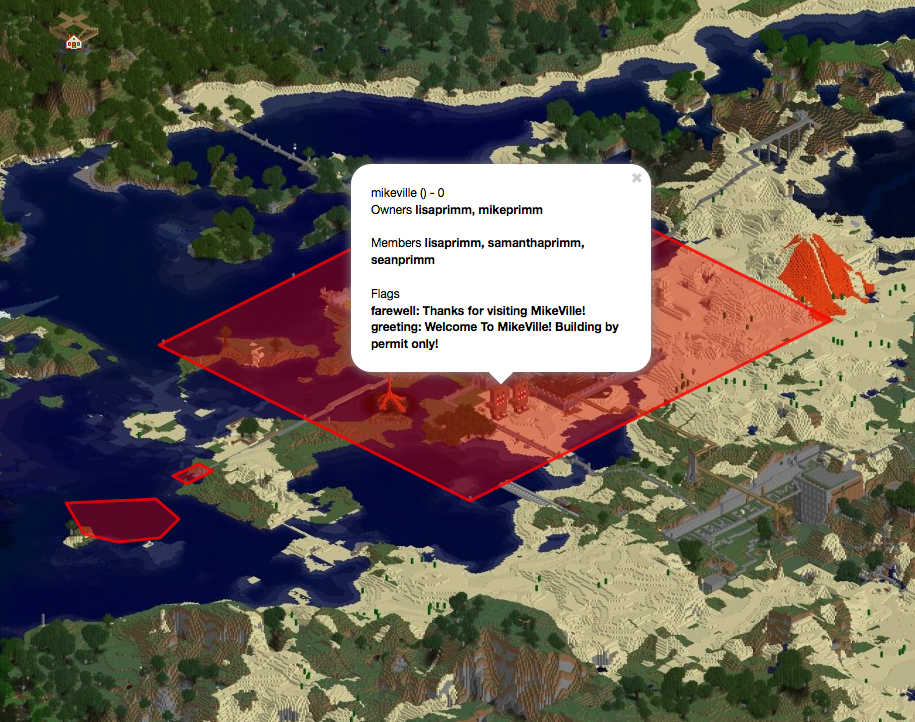
Dynmap WorldGuard is a Bukkit plugin that connects WorldGuard protection data with Dynmap’s interactive maps. It displays protected regions as colored overlays, allowing administrators and players to identify claims, spawn areas, event zones, and other restricted locations directly from the web map. Region names and additional information can also be shown, making large servers easier to understand and navigate.
The plugin reads regions through the WorldGuard API and refreshes changes automatically at a configurable interval, set to 300 seconds by default. Visibility can be managed by showing or hiding selected regions, entire worlds, or custom groups. For our BoxToPlay team, it is a practical addition to any Minecraft server using Dynmap and WorldGuard.
Available Versions
How to add Dynmap-WorldGuard to your Minecraft server
Select your version
Select the version of Dynmap-WorldGuard you want installed on your Minecraft server.
Check your cart
You go directly to your cart with the Minecraft plan and selected version of Dynmap-WorldGuard already included. Check that everything is correct before continuing.
Receive your server
Wait while your Minecraft server is built and delivered. Installation of your selected Dynmap-WorldGuard version starts during setup. Once it is ready, connect and have fun.
Ready to use Dynmap-WorldGuard?
Create your Minecraft server and install the Dynmap-WorldGuard plugin with one click!