
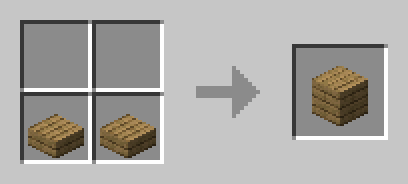
Datapack slab back
slab back
Slab Back, craft slabs back to blocks
Slab Back is a lightweight Minecraft datapack for Java Edition that adds a practical reverse crafting recipe. Place two matching slabs side by side in the crafting grid to recover one corresponding full block. This is useful when a building project leaves you with unwanted slabs or when you need to reuse materials without mining again.
Designed for singleplayer and server side use, it preserves a familiar vanilla style while making building and storage more flexible. On a Minecraft server, players can correct crafting mistakes, reduce inventory clutter, and redirect resources to new projects. BoxToPlay makes this quality of life content easy to enjoy in a streamlined server experience.
Versions
How to add slab back to your Minecraft world
Select your version
Select the version of slab back you want installed on your Minecraft server.
Check your cart
You go directly to your cart with the Minecraft plan and selected version of slab back already included. Check that everything is correct before continuing.
Receive your server
Wait while your Minecraft server is built and delivered. Installation of your selected slab back version starts during setup. Once it is ready, connect and have fun.
Ready to use slab back?
Create your Minecraft server and install the slab back datapack with one click.