
Datapack Multiplayer Display HUD
Multiplayer Display HUD
Multiplayer Display HUD
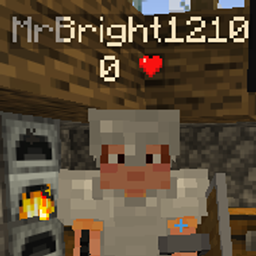
Multiplayer Display HUD is a Minecraft Java Edition datapack that brings useful player information into familiar scoreboard locations, without requiring mods or a custom client. On a Minecraft server, each player’s health appears below their name and beside it in the TAB player list, making team coordination and combat awareness easier.
The pack also places everyone’s experience level in the sidebar scoreboard, with display behavior adjustable through commands. Designed as a lightweight social and utility enhancement, it keeps multiplayer statistics visible at a glance while preserving the vanilla feel. At BoxToPlay, we recommend it for survival servers, cooperative worlds, and community gameplay.
Available Versions
How to add Multiplayer Display HUD to your Minecraft world
Select your version
Select the version of Multiplayer Display HUD you want installed on your Minecraft server.
Check your cart
You go directly to your cart with the Minecraft plan and selected version of Multiplayer Display HUD already included. Check that everything is correct before continuing.
Receive your server
Wait while your Minecraft server is built and delivered. Installation of your selected Multiplayer Display HUD version starts during setup. Once it is ready, connect and have fun.
Ready to use Multiplayer Display HUD?
Create your Minecraft server and install the Multiplayer Display HUD datapack with one click.