
Plugin SignCodePad
SignCodePad
SignCodePad, a code pad on wall signs
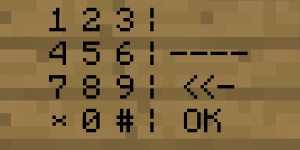
SignCodePad is a Bukkit plugin that turns a Minecraft wall sign into an interactive code pad, without requiring client modifications. Players enter a code configured by the administrator, then the plugin powers a redstone torch when the answer is correct, allowing doors, pistons, or other mechanisms to respond.
Wrong codes can trigger a separate redstone output for traps or alarms. Torch positions and activation duration are configurable, while codes are stored as MD5 hashes. The plugin also offers permissions, calibration for different texture packs, block locking, and protection against unauthorized destruction. For our BoxToPlay team, it is a compact choice for puzzle rooms, secure entrances, and adventure focused Minecraft server builds. Its listed compatibility reaches CraftBukkit 1.6.2 R0.1.
Available Versions
How to add SignCodePad to your Minecraft server
Select your version
Select the version of SignCodePad you want installed on your Minecraft server.
Check your cart
You go directly to your cart with the Minecraft plan and selected version of SignCodePad already included. Check that everything is correct before continuing.
Receive your server
Wait while your Minecraft server is built and delivered. Installation of your selected SignCodePad version starts during setup. Once it is ready, connect and have fun.
Ready to use SignCodePad?
Create your Minecraft server and install the SignCodePad plugin with one click!