
Add-on Mobs Plus Addon
Mobs Plus Addon
Mobs Plus Addon for Minecraft Bedrock
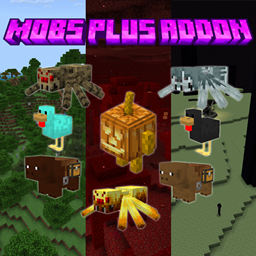
Mobs Plus Addon is a Minecraft Bedrock add on that expands familiar creatures with a broad selection of mob variations. It introduces nine spider variants, four skeleton variants, four chicken variants, two horse variants, plus several pig variations, giving exploration, combat, and animal encounters a more diverse feel while preserving the recognizable identity of these creatures.
The project includes behavior and resource pack components and is designed to work alongside other add ons. On a Minecraft server, it adds variety to survival worlds and shared adventures. At BoxToPlay, we see it as a practical way to refresh familiar environments without changing the core Minecraft experience.
Available Versions
How to add Mobs Plus Addon to your Bedrock server
Select your version
Select the version of Mobs Plus Addon you want installed on your Minecraft Bedrock server.
Check your cart
You go directly to your cart with the Minecraft Bedrock plan and selected version of Mobs Plus Addon already included. Check that everything is correct before continuing.
Receive your server
Wait while your Minecraft Bedrock server is built and delivered. Installation of your selected Mobs Plus Addon version starts during setup. Once it is ready, connect and have fun.
Ready to use Mobs Plus Addon?
Create your Minecraft Bedrock server and install the Mobs Plus Addon add-on with one click!