
Map Skyline City
Skyline City
Skyline City Minecraft Map
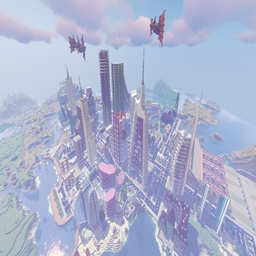
Skyline City is a creative Minecraft map built as a lively modern metropolis for exploration, sightseeing, and relaxed multiplayer sessions. Its skyline is formed by nine distinctive skyscrapers, complemented by smaller residential areas, roads, vehicles, traffic lights, and other urban details that give the setting a convincing sense of scale.
Beyond the city streets, players can discover three main roller coasters, cathedrals, theater spaces, flying boats, a mountain retreat, and a large train station. With varied landmarks and open areas, the map suits adventure, creation, and survival themed play on a Minecraft server. At BoxToPlay, we recommend it for groups seeking an entertaining city playground.
Available versions
How to add Skyline City as a Minecraft world
Select your version
Select the version of Skyline City you want to use as your Minecraft world.
Check your cart
You go directly to your cart with the Minecraft plan and selected version of Skyline City already included. Check that everything is correct before continuing.
Receive your server
Wait while your Minecraft server is built and delivered. Your selected Skyline City world version is prepared during setup. Once it is ready, connect and have fun.
Ready to play Skyline City?
Create your Minecraft server and install the Skyline City map as a new world in one click.