
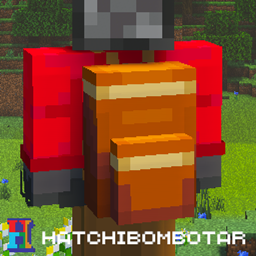
Add-on Bundlepacks (Backpacks)
Bundlepacks (Backpacks)
Bundlepacks, Backpacks for Minecraft Bedrock
Bundlepacks is a Minecraft Bedrock add-on that introduces portable storage containers designed to make exploration, mining, and building easier. Each bundlepack can hold up to 27 item stacks, letting you carry more supplies while keeping your inventory organized. The pack can be crafted in an undyed version, then customized with any of 16 dye colors, making it simple to sort tools, blocks, food, or resources by color.
Open a bundlepack directly as a normal container while holding it, whether you play with a keyboard, controller, or touch controls. Some items cannot be stored because of technical limitations. On a Minecraft server, our team at BoxToPlay recommends it for players who want practical extra storage without changing the core survival experience.
Available Versions
How to add Bundlepacks (Backpacks) to your Bedrock server
Select your version
Select the version of Bundlepacks (Backpacks) you want installed on your Minecraft Bedrock server.
Check your cart
You go directly to your cart with the Minecraft Bedrock plan and selected version of Bundlepacks (Backpacks) already included. Check that everything is correct before continuing.
Receive your server
Wait while your Minecraft Bedrock server is built and delivered. Installation of your selected Bundlepacks (Backpacks) version starts during setup. Once it is ready, connect and have fun.
Ready to use Bundlepacks (Backpacks)?
Create your Minecraft Bedrock server and install the Bundlepacks (Backpacks) add-on with one click!